
Privacy and data choices
Review the Terms and Privacy versions you accepted, and turn optional news, personalised offers, and partner interest on or off.
Updated 2026-10-21 · TH
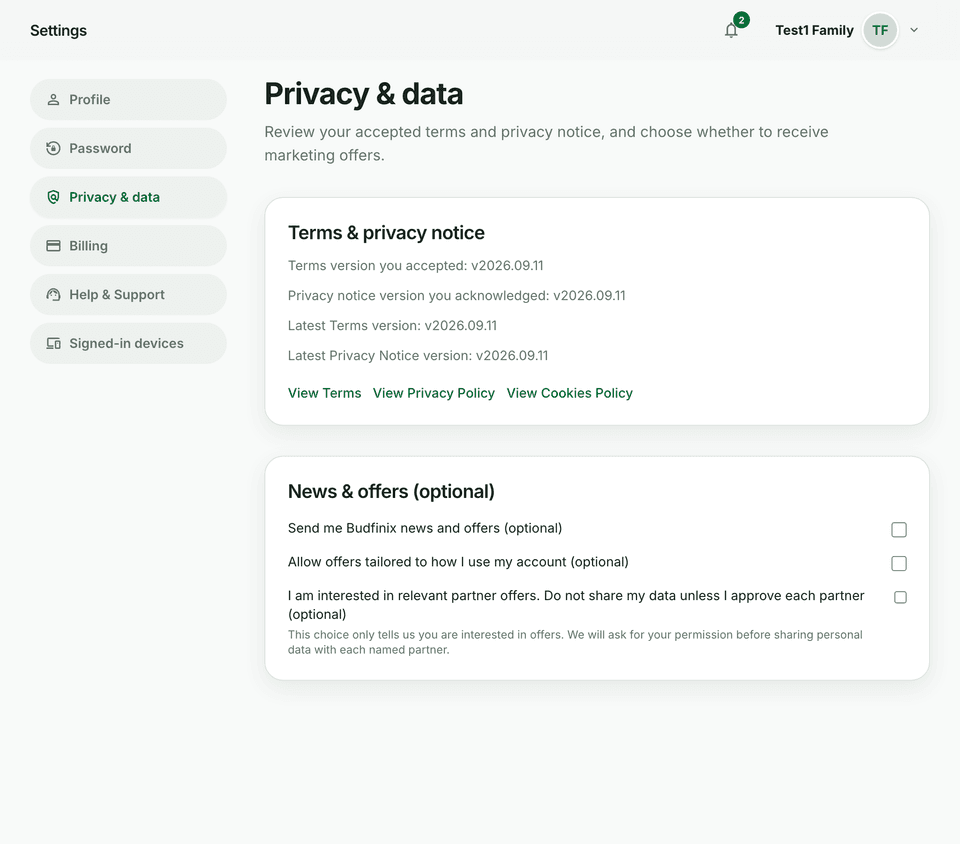
Settings → Privacy & data shows which legal versions you accepted and the optional offers you can turn on later. The same optional choices also appear when you create an account.
Steps
- Open Settings → Privacy & data.
- Under Terms & privacy notice, compare the version you accepted with the latest Terms and Privacy Notice. Open View Terms, View Privacy Policy, or View Cookies Policy to read them.
- Under News & offers (optional), choose any of these:
- Send me Budfinix news and offers
- Allow offers tailored to how I use my account
- I am interested in relevant partner offers — this records interest only. Budfinix asks before sharing personal data with each named partner.
- Save. A confirmation appears when the choices are stored.
Tips
- Accepting Terms and acknowledging the Privacy Policy is required at signup. The three offer choices are optional.
- Deleting your account is on Settings → Profile, not on this page. See Delete your account.