
Track service subscriptions
On Plus and above, record Spotify, Netflix, and other recurring services, set a reminder, and pause or cancel them.
Updated 2026-10-21 · TH
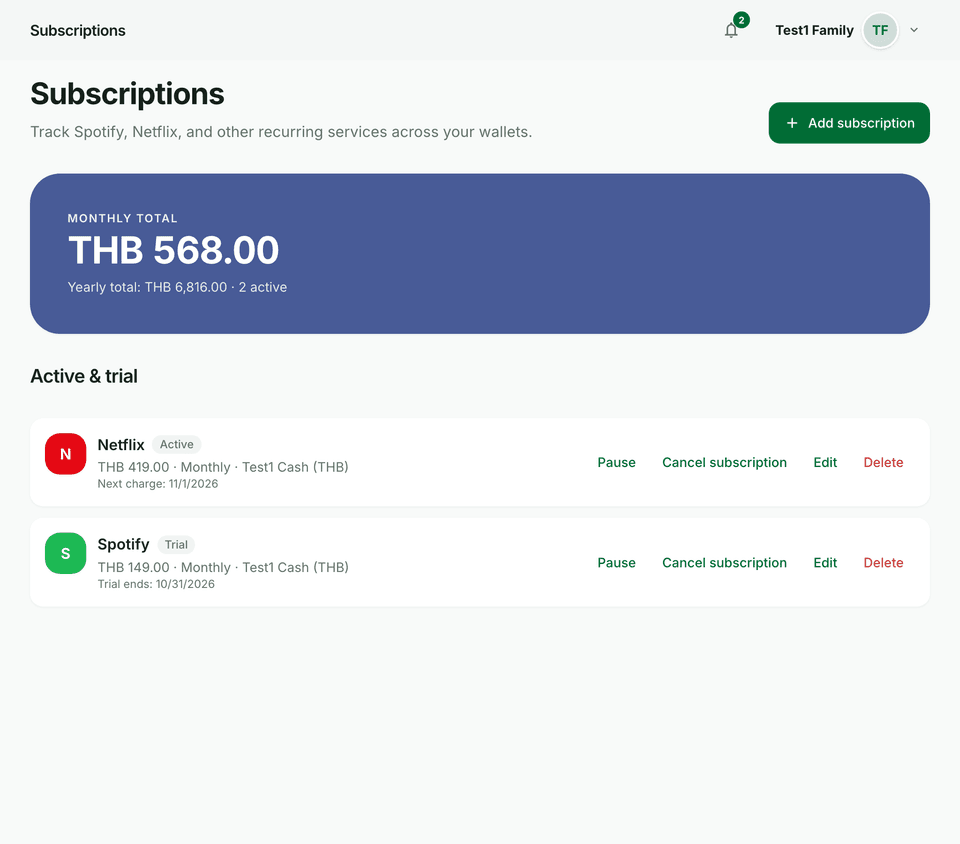
Subscriptions tracks services you pay for again and again, such as Spotify or Netflix. It is separate from a wallet’s Scheduled records tab, which posts income or expense rows on a schedule.
Before you start
- Creating subscriptions requires Plus and above. Free accounts see an upgrade card that links to Settings → Billing → Plans.
- Each subscription is tied to a wallet.
Steps
- Open Subscriptions in the main navigation and choose Add subscription.
- Pick a service, or choose Custom and enter a name.
- Set the amount, wallet, frequency (Daily, Weekly, Monthly, or Yearly), and Every (for example, monthly and 2 means every 2 months).
- Set the First charge date. Optionally set Trial ends and a reminder: None, 1 day before, 3 days before, or 7 days before.
- Save. The list shows Monthly total and Yearly total, grouped as Active & trial, Paused, and Cancelled.
- From a row, Pause, Resume, Cancel subscription, Edit, or Delete. Cancel stops future charges; delete removes the subscription. Past wallet transactions stay.
Tips
- Use Scheduled records when you want Budfinix to post a transaction automatically. Use Subscriptions when you want a reminder and a rollup of service spend.
- Deleting a subscription does not delete transactions already recorded in the wallet.